Mission Built

An iPhone app from the Rack

IronStack.

Private beta iPhone

Log it. Time it. Lift each other up. A lifting log that brings your history, talks you through rest, and stays out of your way.

Free during the beta · Keep the app you use now · Your whole log exports any time

Runs on
iPhoneiOS 26 and up
From any app
Bring itsupersets, prep sets
Account to log
NoneSocial is optional
During the beta
FreeCoach included

Bring your history. Keep your app. Try it for two weeks.

Bring it

All of it comes over.

Export from Hevy (Settings, Export & Import Data) or Strong (Settings, Export Data) and open the file in IronStack, or bring any spreadsheet you kept. Sessions, routines as workouts, supersets paired the way you paired them, prep sets and drop sets tagged as what they were. Names it knows are matched; names it does not are kept exactly as you had them. A preview shows what it found before anything is saved.

Keep your app

Nothing here needs you to quit.

The import reads a file you exported. It never signs in to Hevy or Strong, never touches your account, and bringing the same file twice adds nothing. Run both for a couple of weeks and keep whichever earns it.

Tap, type or say it

You never have to talk to it.

Last time's weight and reps are already in every set, so most sets are one tap to confirm. Or type 225x8 in the one field. Voice is there for the days your hands are covered in chalk, and only while you hold the button.

JuggernautAI history comes over the same way. What it will not do yet: a watch app, Android, or exercise videos. If you need those, keep the other app for them.


Six things a logging app should have done already.

Every screen here is the real app on my phone, with my own training behind it. Social is the app's sample feed, because my spotters' sessions are theirs to share, not mine.

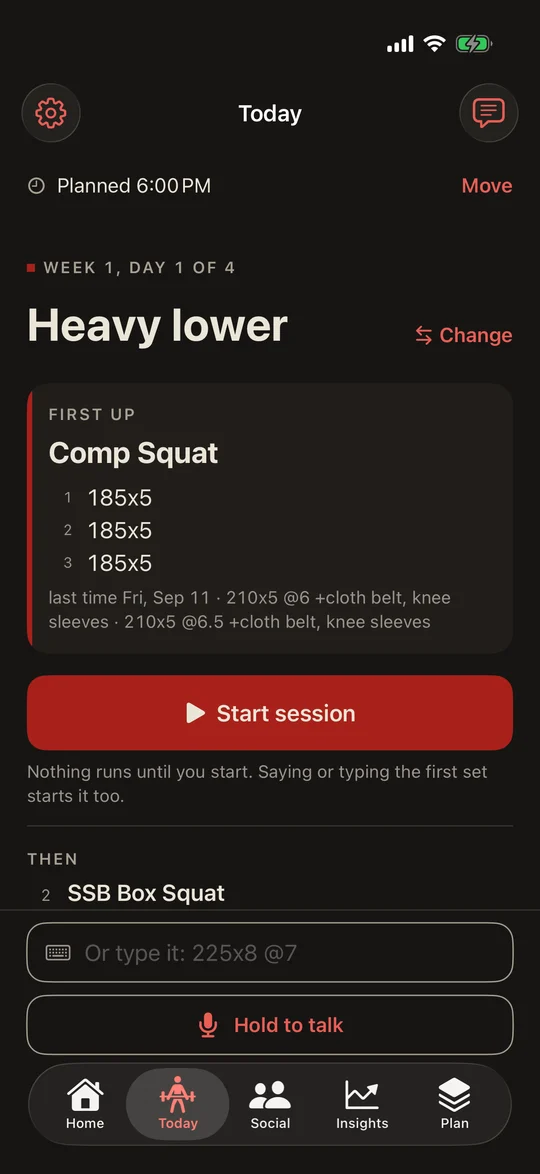
IronStack Today before the start: Planned 6:00 PM with Move, Heavy lower from Shaw Elite with Change, Comp Squat first up at 185 for 5 with last time, and one Start session button.

Logging · Chalk on your hands

Tap it, type it, or say it.

Last time's numbers are already in the set: tap to confirm. Changed something? Type 225x8 @7 in the one field. Or hold the talk button and say "two twenty five for eight at seven"; "same again" and "switch to hack squat" work too. Speech is turned into text on the phone, offline, and only while you hold the button.

Other apps: Tap the numbers in, set by set, with a keypad.

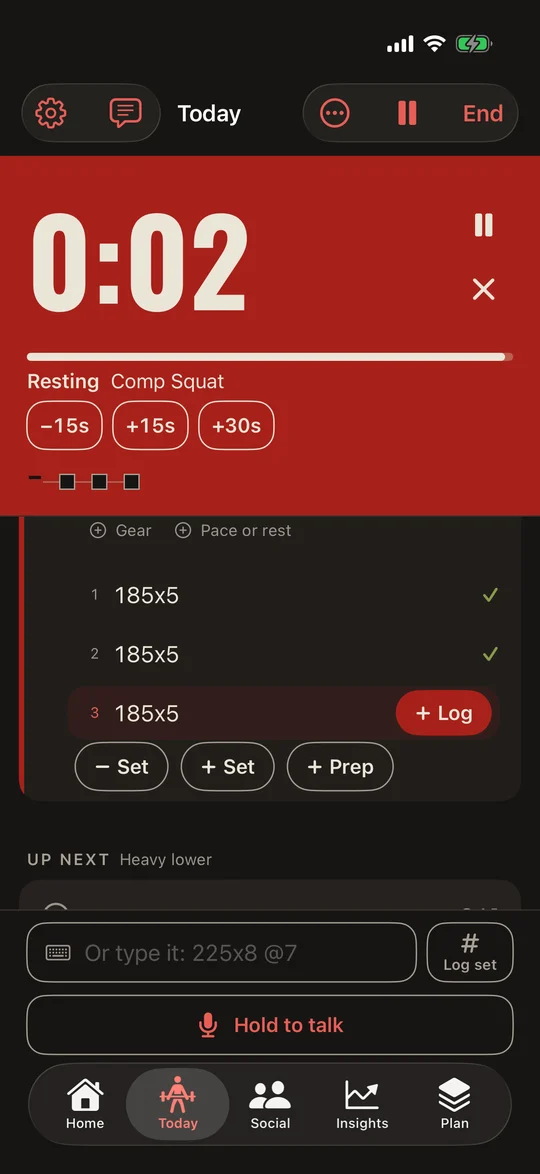
The IronStack rest clock at 0:02: the top of the screen solid oxblood, with the squares row under it.

The clock · Chalk on your hands

A rest clock you can read from the platform.

The set lands and rest starts itself, at the length the program asked for. With earbuds in, a recorded voice calls "Thirty seconds", "Five seconds" and "Get to work", and your music dips under it and comes back. Voice, buzz or off, and it minds the silent switch. On screen the last ten seconds go oxblood and the last three fill the top and beat. On the Lock Screen, "same again" logs another set like the last without unlocking the phone.

Other apps: A timer that buzzes, and a phone to unlock to log the next set.

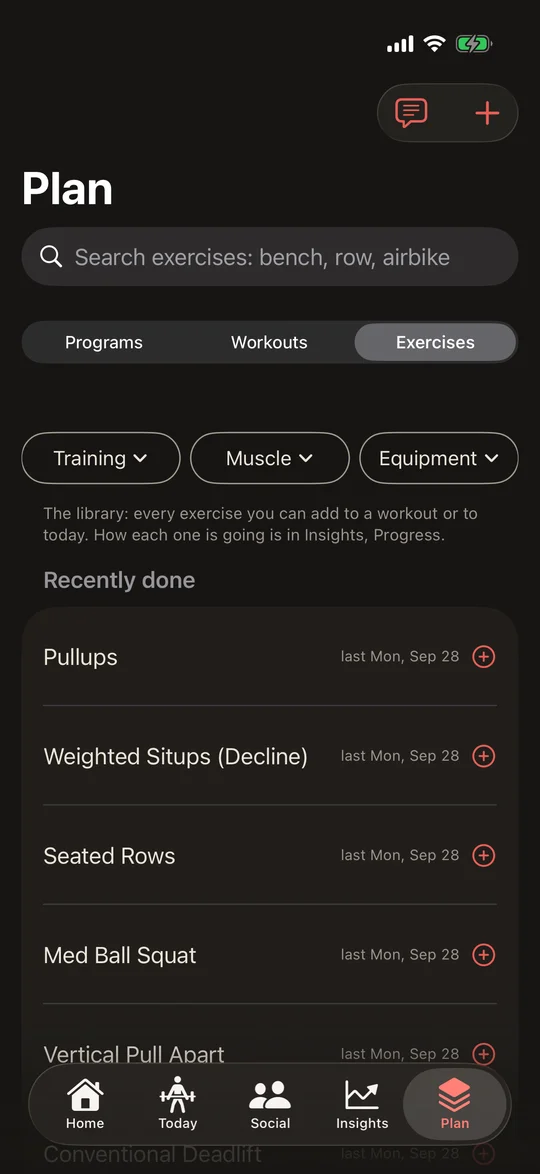
IronStack Plan tab on Exercises: search, Training, Muscle and Equipment filters, and recently done exercises.

Plan · Capture cannot fail

Bring the plan you already have.

Programs, workouts and exercises, on one tab. Bring your history over from Hevy, Strong, JuggernautAI or any spreadsheet you kept, send Coach a photo or PDF of your program and it writes it down, or save today's session as a workout. Workouts hold your targets, 3 × 8 · 135 lb, and next time last session's numbers are already in every set. Logging becomes confirming.

Other apps: Routines and custom exercises capped on the free tier.

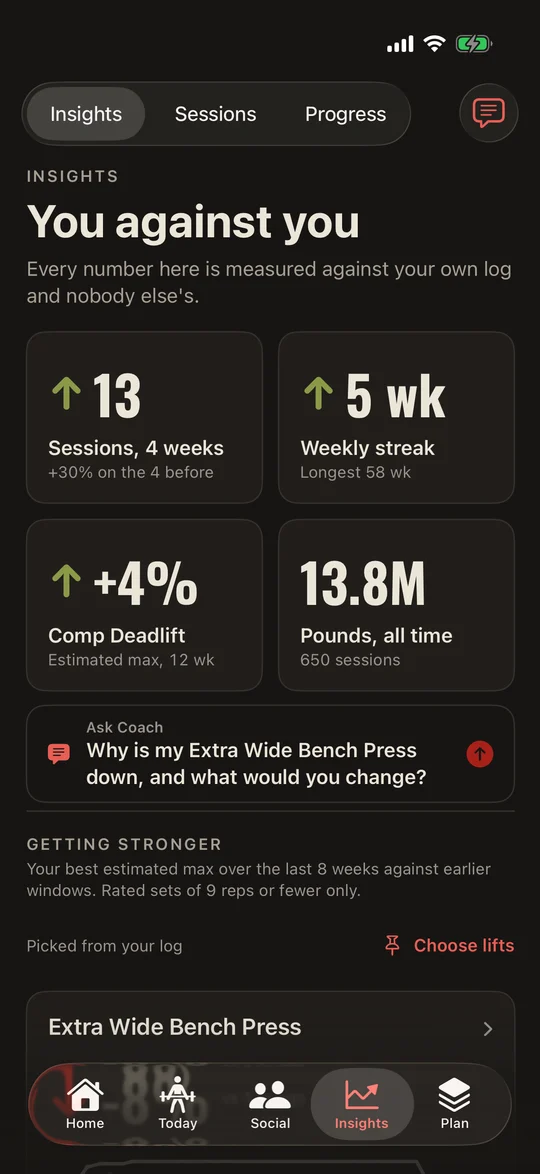
IronStack Insights: 13 sessions in 4 weeks, a 5 week streak, Comp Deadlift estimated max up 4 percent, 13.8 million pounds all time.

Insights · You against you

Every number is you against you.

Sessions this month against last, your estimated max over twelve weeks, records by name, a progress line on every exercise, and how you lift on the days you feel good against the flat ones. Measured against your own log and nobody else's. When the data is thin, it says so instead of guessing.

Other apps: Graphs, only the last three months of them on Hevy's free tier. Working out what they mean is your job.

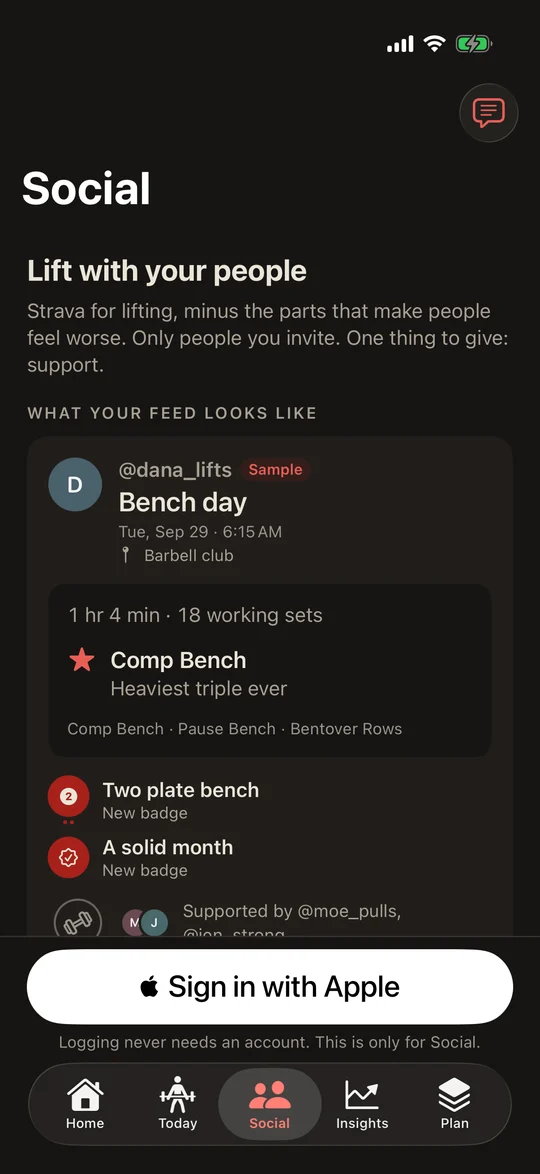
IronStack Social before you sign in: a sample Bench day card with a heaviest triple and two new badges, supported by spotters.

Social · Lift each other up

A quiet way to share with the people you train with.

Invite a training partner by text. Share a session as a card: time, sets, the best thing you did. No strangers, and no comments, on purpose: the one thing to give is support, and you see who gave it. If your crew lives in the comments, this is not trying to replace that. Social is optional, and nothing else here needs it.

Other apps: Followers, strangers, likes and comments.

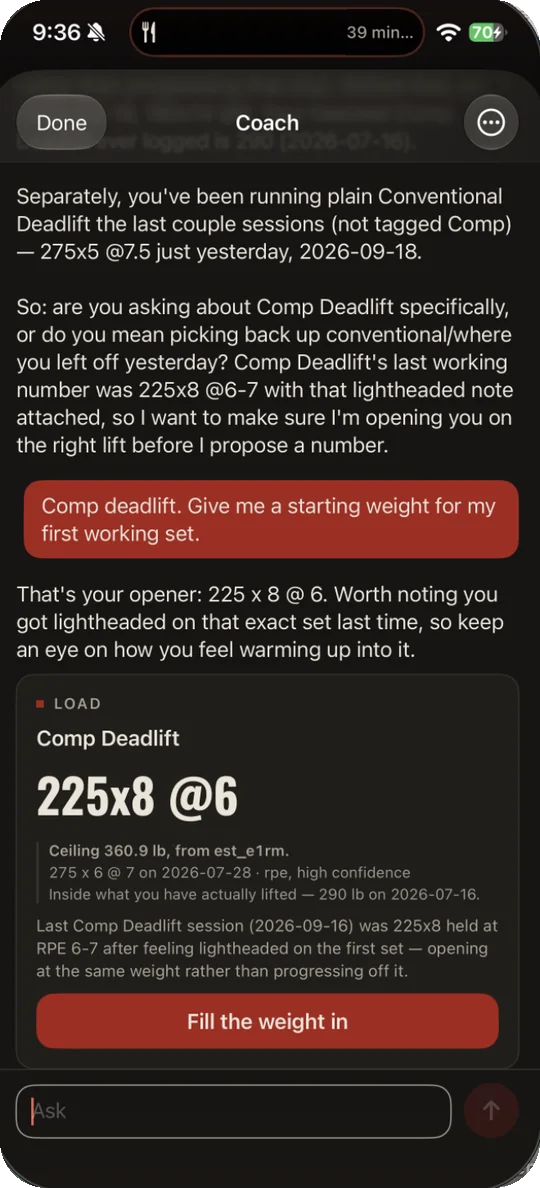
IronStack Coach proposing a Comp Deadlift opener of 225x8 at RPE 6, with the ceiling and the sets it came from, and a Fill the weight in button.

Coach · You against you

A coach with a ceiling.

Ask what to open at, what covers a taken rack, or how today went. Send it a photo or PDF of the program your coach wrote and it writes it down for you to check. Every weight it names comes from your own sets, under a ceiling it can show you, with the set the ceiling came from. Nothing it suggests lands in your log until you tap. Not a doctor, and it says so.

Other apps: A chatbot that invents a number, or no number at all.

More of the app

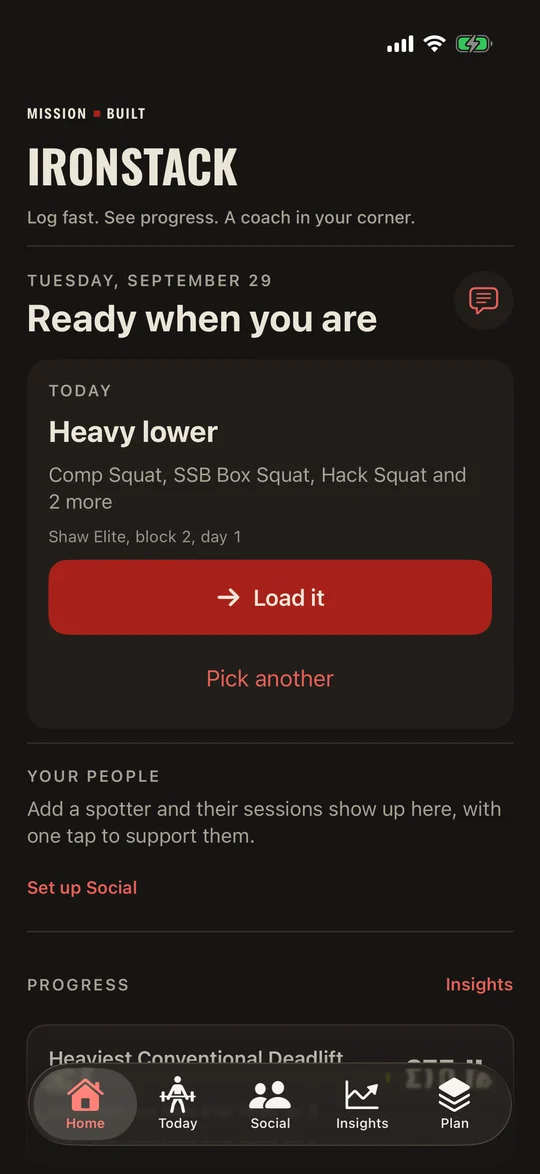
IronStack Home: the Mission Built header, Today with Heavy lower and a Load it button, Your people, and Progress.
HomeToday first: what is on the docket, loaded in one tap. Then your people, who is in your corner, your progress, and Coach.
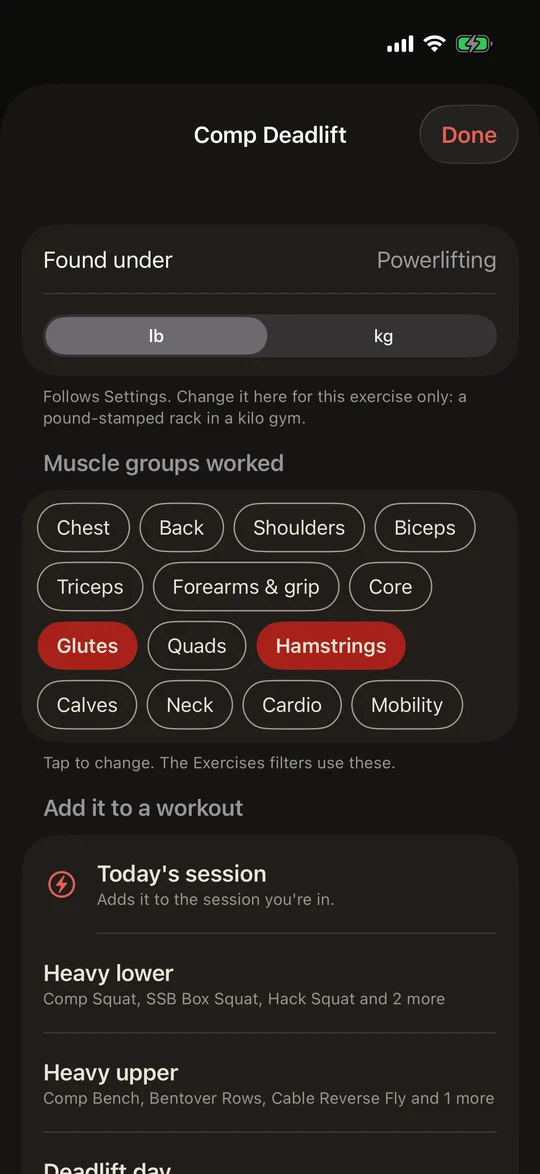
IronStack Comp Deadlift page: the muscle groups it works, and Add it to a workout with Today's session first.
An exerciseEvery exercise, with the muscles it works. Add it to today's session, or to a workout, in one tap.
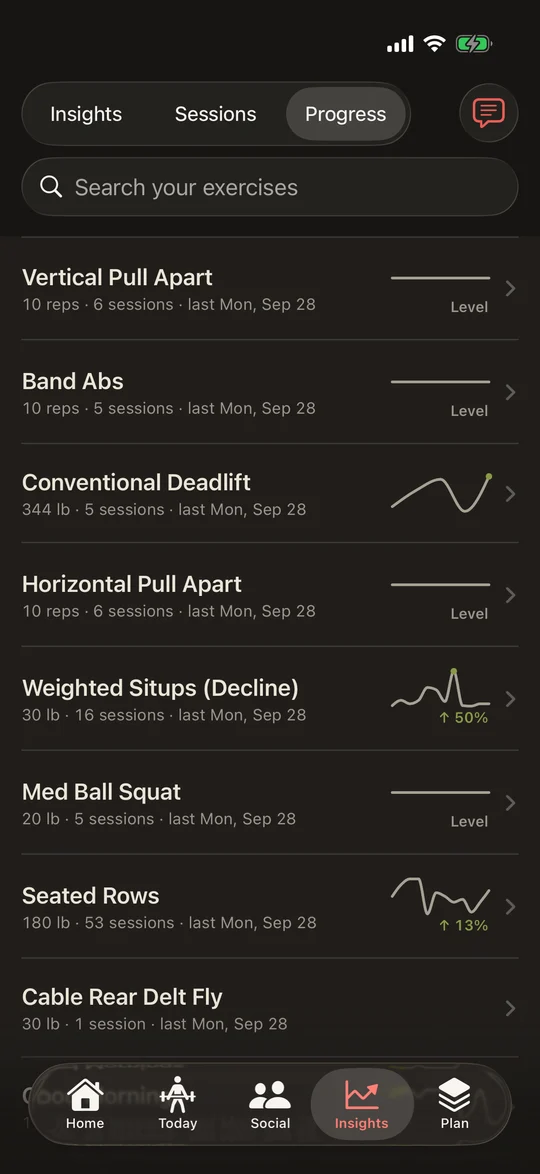
IronStack Progress: every exercise with its sparkline and the change.
ProgressEvery exercise you have done, with its line and the change.
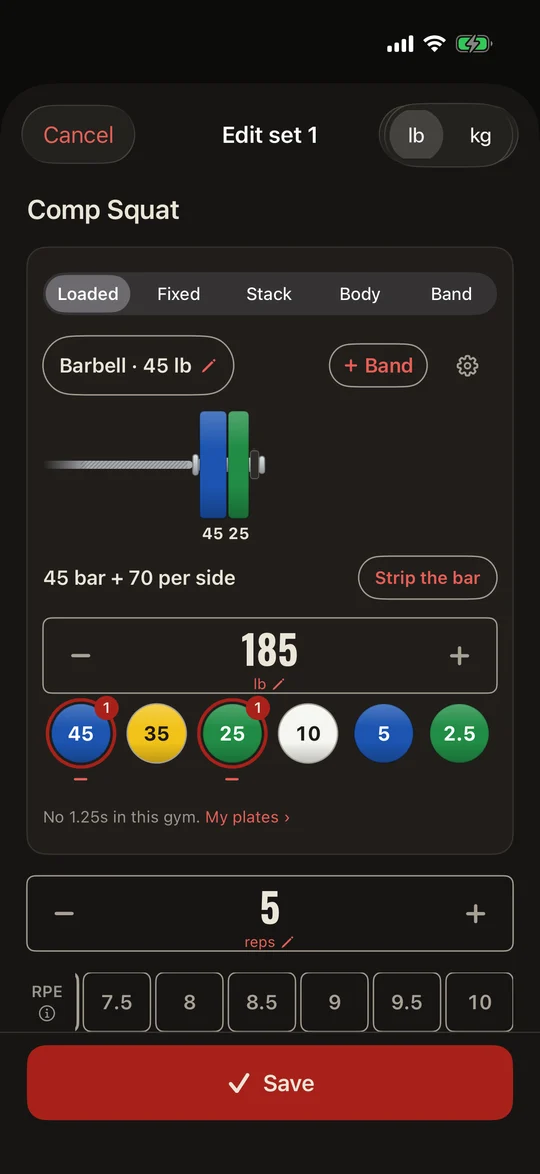
IronStack set sheet for Comp Squat: Loaded, Barbell 45 lb, the bar drawn with its plates, 45 bar + 70 per side, 185 lb for 5, and an RPE row above Save.
The set sheetThe load card fits the lift: a barbell drawn the way it is loaded, 45 bar and 70 per side, plates a tap each, RPE in one row.
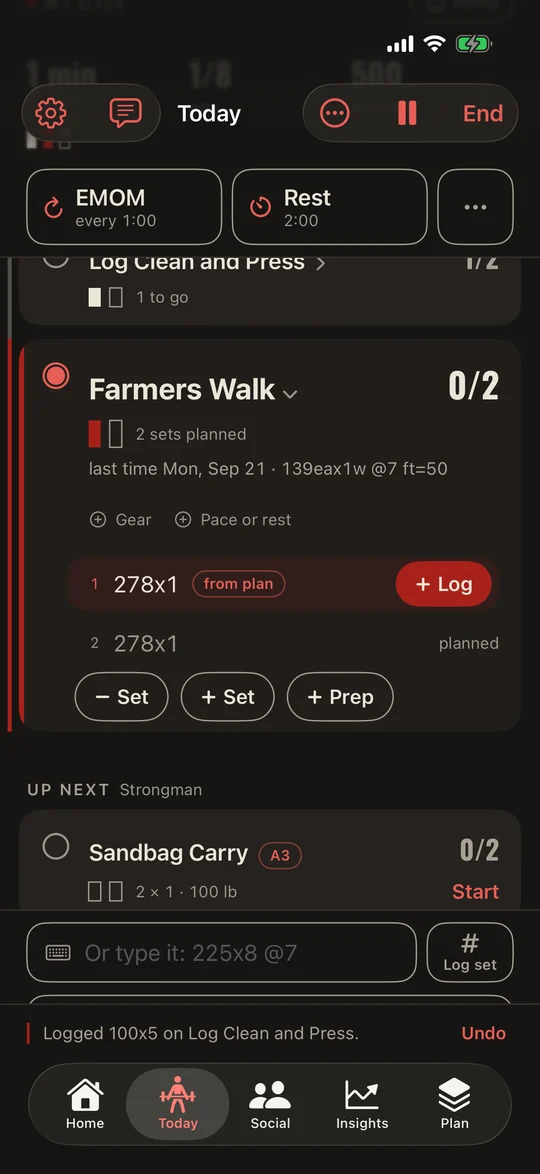
IronStack Today on a Strongman circuit: Log Clean and Press logged, Farmers Walk up next at 278 for 1 from the plan, then Sandbag Carry and Kettlebell Swing.
A circuitExercises done together, lettered A1 to A4. Log one and the next is up.
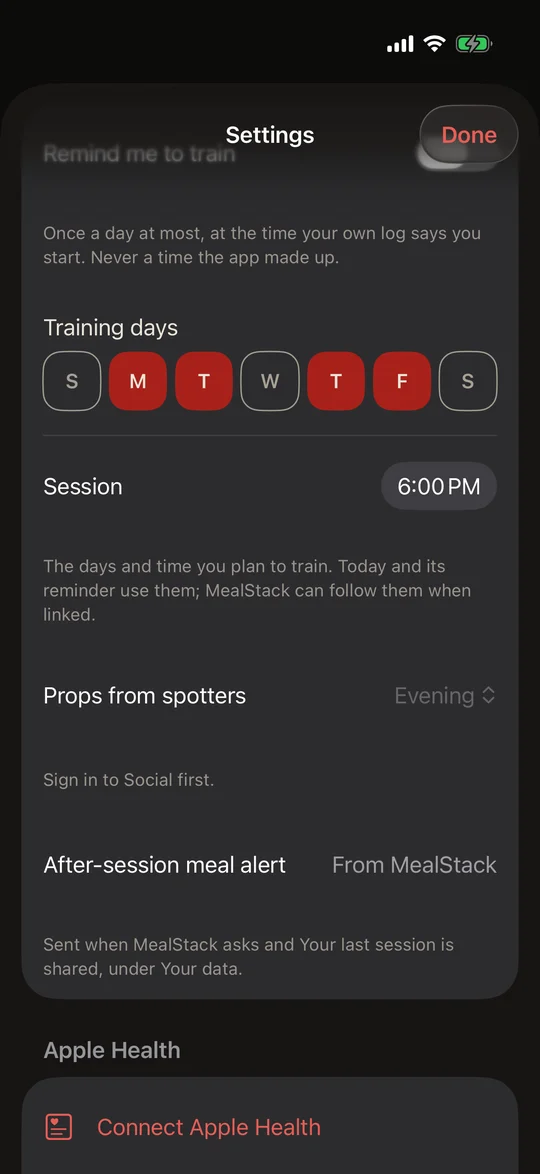
IronStack Settings: training days Monday, Tuesday, Thursday and Friday, and a 6:00 PM session.
Training daysYour training days and session time. Today plans from them, and MealStack can follow.
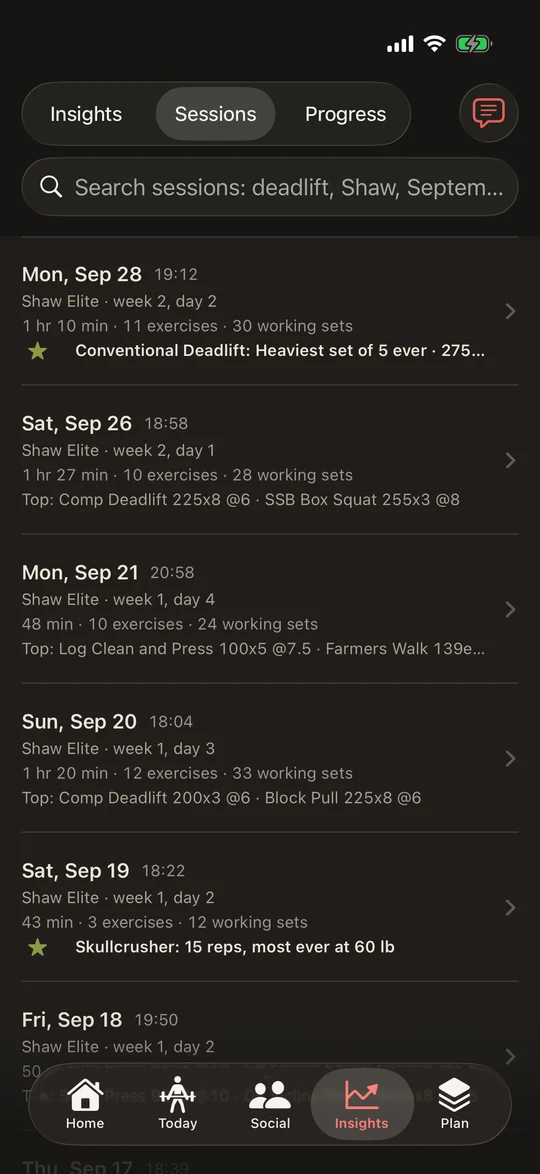
IronStack Sessions: each session with its program day, time, working sets and top sets, and a record called out by name.
SessionsEvery session, searchable, records called out by name.

Screens from IronStack 0.1.1 in the iPhone Simulator, loaded with my own training log, Sept 29, 2026. Coach is from my iPhone. The Social screen is the sample feed the app shows before you sign in.


A set that happened gets written down.

The first IronStack lived on my laptop, and it was good at telling me what a week meant. Then one day I named an exercise it had never heard of, and it would not take the set. A log that can refuse a set you did is not a log.

So I rebuilt it around one rule, and put it on my phone, because the rack is where the set happens and my hands are covered in chalk. I wanted a log that takes whatever you did, reads the clock to you, and treats the people you train with as partners rather than an audience. Four ideas hold up everything it does.

  1. 01Capture cannot failA set you did is a fact. A name the app does not know is kept exactly as you said it, never refused.
  2. 02Chalk on your handsTap, type or say the set. Big targets. A clock you can read from the platform and hear in your earbuds.
  3. 03You against youEvery number is measured against your own log. No leaderboards, no strangers, no one else's PR.
  4. 04Lift each other upOnly the people you invite. Cards carry no comments, and a name you type is checked before it goes. The one thing you can give is support.

Say it the way you would say it to a partner.

Voice is optional; typing the same words works too. These are the examples on the app's own voice card. Tap one to see what it writes down. Then start a rest and watch the end of it.

You say

IronStack writes

225x8 @7

225 lb for 8 reps at RPE 7, on the lift you are doing.

Rest

0:20

Twenty seconds here; three minutes in the gym. Watch the last ten.

Speech becomes text on the phone, offline, and only while you hold the button. Weight comes before reps, the way lifters say it; RPE is how hard it was on a scale to 10, and the app explains it wherever you rate a set. The rest clock is the length your program asked for. The app never records what you actually rested, because it does not know.


Open it, log the first set, get on with it.

  1. 01

    Bring your history, or just start.

    Coming from Hevy, Strong, JuggernautAI or a spreadsheet? Export, open the file, and the preview says what it found before anything lands: sessions, workouts, and names to check. Or skip it and log your first set. That starts the session.

  2. 02

    Log it. Time it.

    Tap the number that is already there, type it, or say it. Rest starts itself. Bodyweight comes from Apple Health if you let it, and you can always type over it. Tap the weight to change it; the keypad converts pounds and kilos on the spot.

  3. 03

    Stacked.

    Finish and the session closes on what mattered: time, working sets, records by name, a badge if you earned one. Share the card with your spotters, or don't. Next time, today's lifts are waiting with what you hit.

And the rest

An exercise is not always a lift: the collection covers barbell, machines and bodybuilding, conditioning (twenty minutes on the air bike is a session too) and strongman, browsable by muscle group. Every exercise has a load card that fits it: a loaded bar with plate math, a fixed bar, a stack, bodyweight or a band. Plate math switches itself off for cables, machines, dumbbells, kettlebells and bands. Home or Away on Today for sessions on the road, flipped by hand or automatically when you are far from home, and shared with MealStack if it is on the phone. A Home Screen widget, and badges that grow with you over years, not just the first week. Apple Health fills in your weigh-in, and can take each session as a strength workout. Your whole log exports in one file, in a documented format, any time.


Next to the app you use now.

Written against Hevy's and Strong's free tiers as of September 2026. If a line is wrong, tell me and it changes.

Other appsIronStack
Logging a setTap the numbers in, or check off last time's.The same, plus type 225x8 in one field, or say it.
RestA timer that buzzes.Starts itself, calls "Thirty seconds", "Five seconds" and "Get to work" in your earbuds, and fills the screen at the end.
A new exerciseMake a custom one first; the free tier allows seven.Say or type any name. It is kept exactly as you said it. Match it later, or never.
What is freeEvery workout, but four routines and three months of graphs.Every session, every workout, every chart, free in the beta. The launch price is not set; the fine print says why.
SocialFollowers, strangers, likes and comments.Only partners you invite. Support, no comments, on purpose.
Best atA watch app, Android, and exercise videos.None of those yet. Keep the other app for them; nothing here needs you to quit it.

Your data, and one thing I have not picked.

The code

Closed app. Open data.

IronStack is a closed-source app from Mission Built. What is open is your data: everything you log exports in one file in the Mission Built Schema, a documented, versioned format, and imports back in. The IronStack name and the marks stay with Mission Built.

Price

Not settled yet. Here is why.

Every Coach question runs on a server I pay for. I want Coach in the app and I am not willing to lose money keeping it there, so the launch price is open: free with Coach on an allowance, a one-time price, or Coach as the paid part of a free app. What is settled: logging, the clock, your whole history and Social will not be what you pay for.

Your data

On your phone. Yours to take.

Your log is files on your phone, and one tap exports all of it in the Mission Built Schema, a documented, versioned format. Coach and Social send only what they need to work. One screen deletes everything, everywhere, and tells you what it deleted. The privacy page says exactly what, where and for how long.

Not a doctor. Not your programmer.

I am not a coach or a clinician, and nothing on this page or in the app is advice about how you should train. IronStack is how I log my own. Coach is an AI: it gives a starting weight under a ceiling it can show you, a cue from your own notes, or an alternative when the rack is taken. It writes down the program you send it and never makes one up, and any question about pain or injury gets pointed to a qualified person.


Private beta, on iPhone.

On TestFlight now, with outside testers

Newest build: IronStack 0.1.1 · Build 50

IronStack logs every session I do, and a small group of outside testers is on it with me. New testers come in small batches, added by hand from the email on your Apple ID, and I would especially like people coming from Hevy or Strong, and training partners who want to try Social together.

You get an email from TestFlight, Apple's own app for trying apps before they reach the App Store: install TestFlight, tap the link, and IronStack installs like any other app. Keep Hevy or Strong on your phone the whole time. The address is used for the invite and nothing else.

Training with someone? Sign up together and put their name in the note, and I will add you in the same batch.

Free during the beta · iPhone, iOS 26 and up · 18 and over · keep your app

Beta

By invite, from the form. Small batches, added by hand.

Now
App Store

The public door, published by Mission Built.

After the beta

The ones I get asked.

Do I have to quit Hevy or Strong?
No. IronStack reads a file you export; it never signs in there or changes anything. Run both for a couple of weeks. If you go back, your app is exactly as you left it. One honest limit: IronStack exports your log as a documented JSON file, not a Hevy or Strong CSV, so sessions you log here will not load into them on their own. If an unbroken Hevy history matters to you, log in both while you try it.
What comes over from Hevy?
Sessions and routines (they come in as workouts), with supersets paired the way Hevy paired them, warm-ups as prep sets and drop sets tagged as what they were, and your custom exercise names kept exactly. The preview shows what it found, and any names it wants you to check, before anything is saved. In Hevy: Settings, Export & Import Data.
What is TestFlight?
Apple's own app for beta testing. I add your Apple ID email, Apple sends you an invite, and TestFlight installs IronStack like an App Store app. Updates arrive through it until 1.0 lands in the store.
Is it free?
During the TestFlight beta, yes. Coach runs on a monthly allowance per phone, because every Coach question runs on a server I pay for. The launch price is not set, and it lands on this page before it lands in the store.
Does it need an account?
Not to log. Everything you log is a file on your phone. Social is the one part that needs you to be someone, and it uses Sign in with Apple without asking for your name or email. Skip Social and there is nothing to sign up for.
What leaves my phone?
What you send Coach, when you ask it something. The cards you choose to share with your spotters, if you use Social. Nothing else unless you switch it on. The privacy page says exactly what, where, and for how long.
Can I bring my history?
Yes. Hevy and Strong exports bring history and routines; JuggernautAI and any spreadsheet you kept bring history, with a preview to match the columns. Imported sessions count in your records, Insights and "last time", are labelled as imported, and never go on a card. Bringing the same file twice adds nothing.
Pounds or kilos?
Both. Pick one for the app, and switch any single exercise the other way, because the dumbbells at a hotel gym do not care where you live. The keypad shows the other unit under every number, and one tap types in it.
Streaks and badges?
A weekly streak on Insights and badges that take years to finish: Road Warrior for training on the road, Dawn patrol, a thousand feet of carries, In their corner for supporting others. Earned, never shamed. Miss a week and nothing scolds you.
Is Coach a doctor?
No. Coach is an AI. It answers from your own sets, never names a weight above a ceiling it can show you, and points any question about pain or injury to a qualified person. Nothing it suggests changes your log until you tap.
Android, iPad, watch?
iPhone only, iOS 26 and up. No Android, no iPad layout, and no watch app yet. What covers some of the watch: the clock talks in your earbuds, and the Lock Screen has a "same again" button that logs a set without unlocking. If your phone lives in a locker, that is not enough, and I would rather say so.
How old do I have to be?
Eighteen, the same as MealStack. IronStack, Coach and Social are for adults.
Is the code open?
No. IronStack is a closed app. Your data is open: one tap exports everything in the Mission Built Schema, and it imports back. The IronStack name and marks stay with Mission Built.
When is 1.0?
When a fresh install has been proven on phones that are not mine, and two lifters who are not me have used Social against each other. The date lands on this page before it lands in the store.
For the data nerds: your log is files.

The phone is where the set gets written down. What you do with the record after that is up to you: it leaves the app as plain files, in a published format, whenever you ask, and any tool you like can read them.

1

The log

An append-only file per day, one event per set, that the app writes and nothing rewrites. Corrections are new lines, never edits. Export the raw log in Settings hands it over as it is, one line per event.

2

The export

Export all my data writes one file in the Mission Built Schema: every session and set, your programs, workouts and exercises, and your units. Map coordinates only if you switch them on. Anything that reads JSON reads it, and Bring in data takes it back on a new phone.

3

Any tool

A spreadsheet, a script, a notebook, a database, or the dashboards you already run. I index mine into Elasticsearch and read it in Kibana: how heavy a week was, whether I am ramping, what I have been neglecting. That is a choice, not a requirement; the file works the same in whatever you use.


The fine print.


The other half of the book.

Log it · Time it · Lift each other up

Stacked.